Latest News

June 2021: Profile Manager Release.
3D Kitchen's new Profile Manager will allow users to create, save and apply custom profiles when setting up a new job or modify jobs that have been saved. This will give you the ability to set the wall height, ceiling height, benchtop|Splashback height, base cabinets height/depth, wall cabinets height/depth, pantry cabinets height/depth, oven cabinets height/depth, built in toekick height/depth, Max and Min positions for cabinets, material thicknesses, edge tape, finger pull and cabinet construction for each job.
June 2018: AWISA July 2018.
Come visit the 3d Kitchen stand at Awisa 2018 to see the latest updates and features of our 3d kitchen software, we will be on stand #1142. Click here for more details.
March 2018: 3D Kitchen Version 11.12.
3d Kitchen version 11.12 has been released and has many great new features to make designing even more faster and easier then ever before. New adjustable oven towers, automatic toe kick and counter placement, 2D Printing PDF creator, New 3d Objects, New Materials, The ability to adjust the depths of a group of units at once plus many more new functions and fixes.
November 2017: 3D Kitchen Developer Update.
3d Kitchen developers have been working increadibly hard on alot of new functions and features for the new release of 3d kitchen software here are just a few things to look forward to. New adjustable oven towers, automatic toe kick and counter placement, 2D Printing PDF creator, New 3d Objects, New Materials, The ability to adjust the depths of a group of units at once plus many more new functions and fixes.
October 2016: 3D Kitchen Version 11 Available Now
3d Kitchen version 11 has been released and has many great new features to make designing even more faster and easier then ever before. Click here to view a short video with some of the new features.
June 2016: 3D Kitchen Pro Design Winners
Congratulations to Driscoll Joinery and Cabinet Joinery for winning this months Supplier Magazine 3D Kitchen give away.
May 2016: New Update For Version 10.5
Update to version 10.5 for a range of new 3d kitchen features call your 3d Kitchen rep today for more details Contact Us.
January 2016: 3d Kitchen Add-ons
New add-ons available to update your material libraries with all new patterns and materials have a look on the Online store or click here to see if there are any that you need. All add-on downloads are free for all members that are signed up to 3d Kitchen annual support.
December 2015: Annual Support
New and existing customers now have the opportunity to sign up to 3d Kitchen Annual Support this gives users all year round customer support plus frequent updates and add-ons as they become available, for more information and pricing please contact your nearest 3d Kitchen agent today. CONTACT US
February 2015: 3d Kitchen Store
3d Kitchen now has an Online store were you can purchase and download 3d Kitchen products Online check it out.
October 2014: New Design Items Available Now
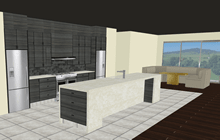
All New design items available for download now free for everyone who is on Annual 3d Kitchen Support.

September 2014: Imperial (INCHES) Version Now Available For The USA
The 3d Kitchen team has just recently developed an Imperial version to introduce and to make the design to production process faster and easier for the American cabinet manufacturing industry. Specifically but not limited to joiners, cabinet makers, shop-fitters and kitchen designers.

August 2014: AWISA Brisbane Show Australia
We had an awesome run at the AWISA show with our New Zealand and Australian agents demonstrating the new and improved 3d Kitchen Software. It turned out to be one of the best AWISA shows we have been part of.
July 2014: All New Drawer Functions in the New Add On For 3d Kitchen
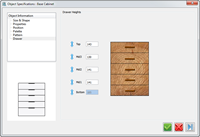
You can now change individual drawer heights in design so you can line up any drawer front in design, this will also produce 100% accurate cut sizes for drawer fronts and for CNC nesting clients this will automatically adjust drilling positions in cabinet ends.

July 2014: Final Update For 3d Kitchen Version 8.8
This will be the last update for 3d kitchen version 8.8, (8,80,52). 3d Kitchen version 8.9 will be available late July early August.
June 2014: New Design Items Available
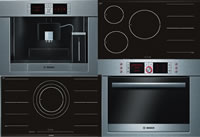
New Ovens, Microwaves, 3D Taps, Accessories, Light Switches, Plugs, Range-hoods, Cook tops and More.
Arborline Door Pricing
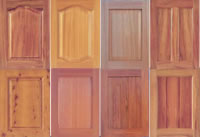
New pricing for Arborline Doors for NZ customers is available email chris@3d1.co.nz for installation instructions